Best Shopify Email Popup App 2026: Grow Your Email List with Poppy
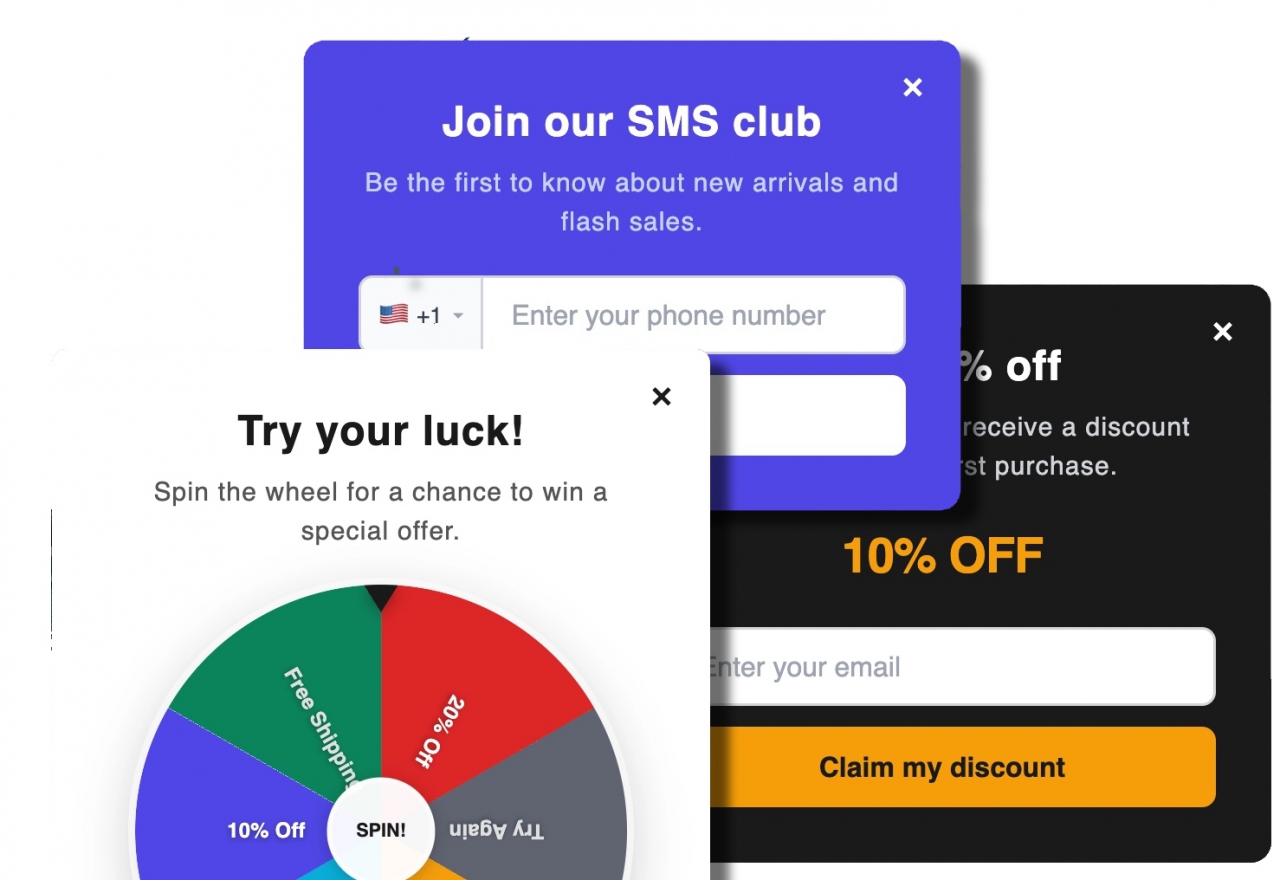
Poppy: 9+ popup types, 6 smart triggers, native sync to Klaviyo, Mailchimp, Omnisend, and Brevo.
Ninety-seven percent of first-time visitors to a Shopify store leave without buying. The average store converts somewhere between one and three percent of traffic. The visitors who leave aren't necessarily gone forever — but without an email address or phone number, you have no way to reach them. They browsed, they left, and that's the end of the relationship.
Email changes the math. Email converts at four to six times the rate of cold traffic because the person on the other end already knows your store. The problem is that most stores let visitors walk away without capturing anything — no email, no phone number, no second chance. One well-timed popup changes that.
But popup apps are not all alike. A basic one shows the same lightbox to every visitor and calls it done. A serious one lets you choose the popup type, define who sees it, when they see it, and routes the captured data directly into your email platform the moment someone submits. This post covers the second kind — a Shopify popup app called Poppy — and how it compares to the alternatives.
Poppy is available on the Shopify App Store.
Install Poppy Free 3-day free trial. No page-view limits.What a Great Shopify Popup App Actually Needs
Multiple popup types. Exit intent for desktop visitors about to leave, scroll depth for mobile users who have engaged, a spin wheel for visitors who need a nudge, a countdown timer for flash sales, surveys to learn why people aren't converting. Apps that do one popup type hit a ceiling fast. Your traffic behaves differently depending on the page, the device, and where the visitor came from — your popup strategy should match that complexity.
Real audience targeting. Showing the same popup to every visitor is the fastest way to train them to close it without reading it. Device type, country, visit count, cart value, page URL pattern, UTM source, Klaviyo list membership: the more targeting dimensions you have, the more relevant each popup becomes — and relevance drives conversions. A returning visitor who is already a subscriber should never see your email capture popup. A new mobile visitor from a paid Instagram campaign should see something different from someone who found you via Google.
Native email platform integration. Capturing emails into a Poppy dashboard and then exporting a CSV to paste into Klaviyo once a week is the 2015 approach. Real-time sync means every submission lands in your welcome flow within seconds. It also means your segmentation stays clean: if someone submits and gets added to your Klaviyo list immediately, they won't be retargeted by the popup again.
Meet Poppy — The Shopify Popup App Built for Growth
Poppy is a Shopify popup and email capture app by GrassJ. It runs as a Theme App Extension, which means it injects a lightweight, asynchronous popup layer into any Shopify storefront without touching the theme's source files. The extension is written in vanilla JavaScript with zero npm dependencies, so it never adds meaningful weight to your page load time.
The admin side — where you build campaigns, design popups, set targeting rules, and view analytics — lives in the Shopify Admin panel. A full visual editor handles design customization without code. Completed form submissions sync to Klaviyo, Mailchimp, Omnisend, or Brevo automatically. Pricing is $25 per month with a 3-day free trial.
Ready to start? Install Poppy on Shopify
9+ Popup Types — One App, Every Use Case
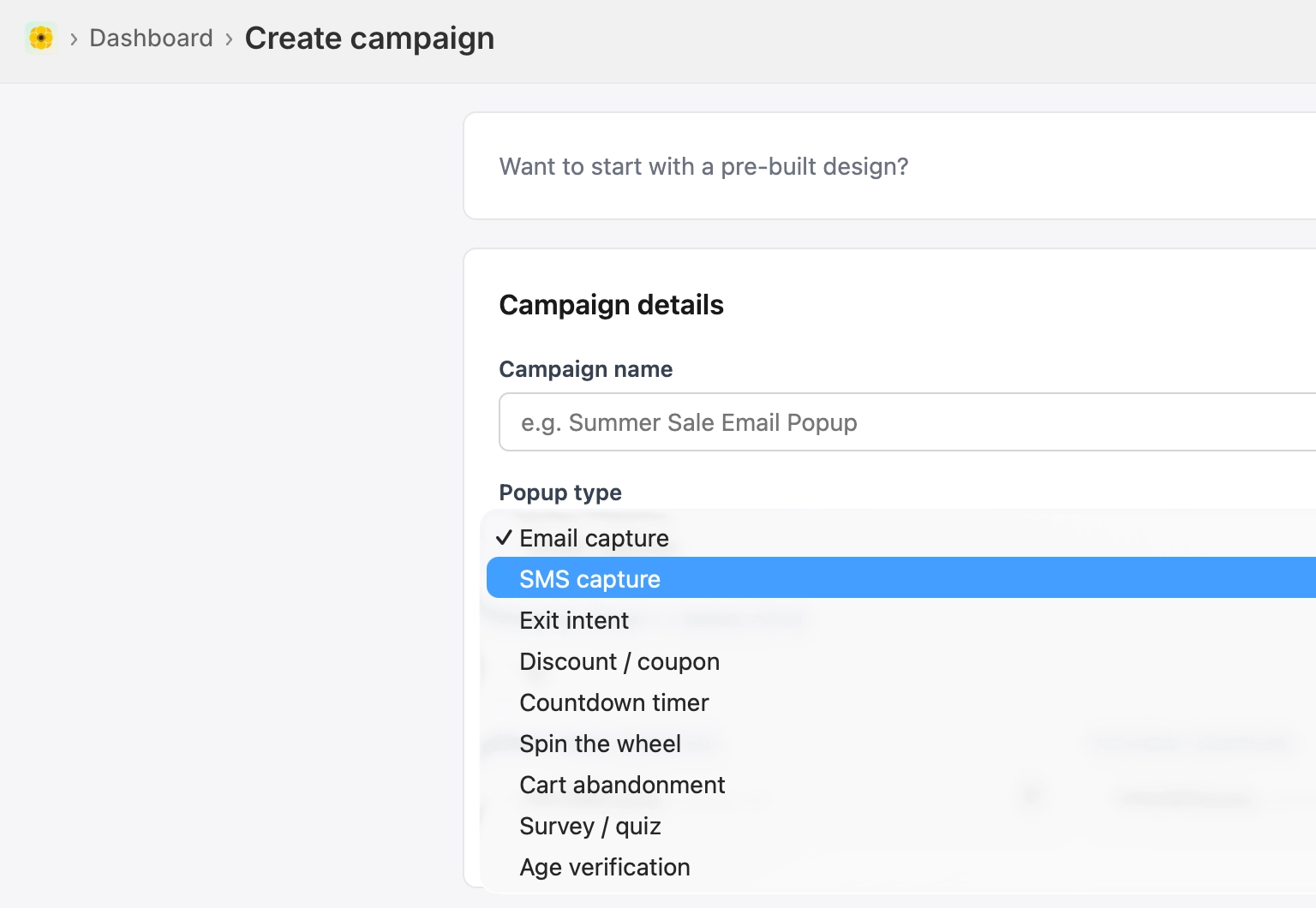
Email Capture Popup
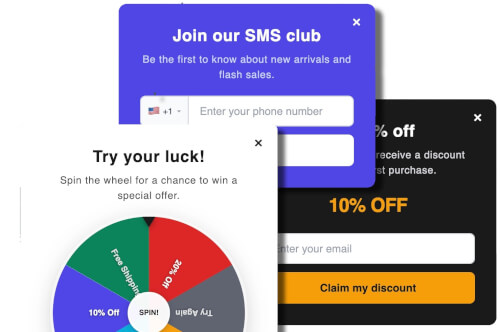
The foundational popup type. A clean form collects email (with optional phone number and name fields) and delivers a discount code or welcome message on submission. Works as a first-session greeter, a timed delay that fires after a visitor has spent a few seconds on a page, or an exit-intent trigger as a last call before they leave. Discount codes can be auto-generated with a custom prefix — every subscriber gets a unique, single-use code.
Spin-to-Win Wheel
The highest-engagement popup type on Shopify. A visitor enters their email address and spins a customizable wheel. Each segment of the wheel can award a percentage discount, a fixed amount off, free shipping, or a no-prize outcome. Prize probability is configurable per segment — you decide whether winning is common (high-conversion, bigger discount budget) or rare (lower cost, higher excitement). Every winning spin generates a unique discount code automatically, so codes cannot be shared between visitors or posted on coupon sites.
Exit Intent Popup
Fires the moment a desktop visitor moves their cursor toward the browser chrome — the address bar, the tab bar, or the window edge — signalling intent to leave. On mobile, Poppy detects the back-button gesture instead. This is the last opportunity to make an impression before the session ends with no data captured. Exit intent pairs naturally with a compelling offer: free shipping, a first-order discount, or a spin-wheel gambit.
Countdown Timer Popup
Time-limited offers convert better than open-ended ones because they create genuine urgency rather than the promise of one. The countdown timer popup displays a live clock alongside your offer — great for flash sales, holiday weekend promotions, or "last 3 hours of free shipping" campaigns. Schedule the campaign window in Poppy and the timer counts down automatically for every visitor.
Cart Abandonment Popup
Triggers when a visitor has items in their cart and shows signs of leaving. Targeting is configurable by cart item quantity (e.g., cart contains more than one item), which is multi-currency safe — unlike cart value thresholds, which vary across markets. Pair with a discount offer and an urgency message to pull visitors back to checkout before they close the tab.
SMS Capture Popup
Collects mobile phone numbers with proper country code selection across 43+ supported countries. Phone numbers are formatted to E.164 standard before syncing. Data flows automatically into Klaviyo, Brevo, and Omnisend's SMS channels — no manual channel activation required. Combine with an email field in a two-field form to capture both contact points in a single popup.
Survey Popup
Multi-step survey forms with radio buttons, checkboxes, and free-text inputs. Use survey popups for post-browse research ("What stopped you from buying today?"), new-visitor product fit questions, or exit surveys that give your marketing and product teams data instead of guesses. Responses are stored alongside session metadata and exportable as CSV.
Age Verification
A compliance gate for merchants selling age-restricted products — alcohol, cannabis, tobacco, or adult content. Visitors confirm their age before accessing the storefront. The gate is configurable and can be set to appear on every page load or once per session.
Sales Notification (Social Proof)
Unobtrusive notification banners that display recent purchase activity on your store. "Someone in Austin just bought [product]" creates social proof and urgency without interrupting the browsing experience. These run alongside other popup campaigns without conflict.
6 Trigger Types — Show the Right Popup at the Right Moment
Every popup campaign in Poppy is attached to one or more trigger conditions. The trigger controls when the popup fires — independent of who it fires for, which is handled by the targeting rules below.
- Exit Intent — Desktop: cursor moves into the browser chrome. Mobile: back-button gesture detected. The last moment before a session ends.
- Time Delay — Fires a set number of seconds after page load. Default is 5 seconds; long enough for the visitor to engage with the page, short enough to catch them before they scroll away.
- Scroll Depth — Fires when the visitor has scrolled a percentage of the page. Default is 50%. On mobile, where exit-intent cursor tracking is unavailable, scroll depth is the natural substitute.
- Element Click — Attaches the popup to any CSS selector. Click a "Claim your discount" link, a product image, or a custom button anywhere on the page, and the popup appears. No theme editing required.
- Cart Update — Fires when a visitor's cart crosses a quantity or value threshold. Useful for "add one more item for free shipping" nudges or abandoned-cart recovery.
- CTA Button — Places a floating button on the storefront that visitors can click to open the popup themselves. Position, icon, and color are all configurable. Works well for persistent "spin the wheel" or "get my discount" buttons.
Precise Audience Targeting — 16 Dimensions
Triggers control when a popup can fire. Targeting rules control who it fires for. In Poppy, targeting rules are stacked — you can require all conditions to be true (AND logic) or any one of them (OR logic). This is where the conversion gains live: a popup shown to the right subset of visitors will always outperform one shown to everyone.
| Category | Targeting options available |
|---|---|
| Visitor behavior | New vs. returning visitor, visit count, total session count |
| Device | Desktop, mobile, tablet |
| Location | Country (Shopify Markets-based, not IP geolocation) |
| Page context | URL exact match, URL substring, URL glob pattern (/products/*), referrer URL |
| Campaign source | UTM source, UTM medium, UTM campaign |
| Cart state | Item quantity, cart value |
| Customer | Shopify customer tags, order count (first-time vs. repeat buyer) |
| Klaviyo integration | Klaviyo list membership, Klaviyo segment membership |
| Time | Time of day (hour window), day of week |
Native Email and SMS Integrations
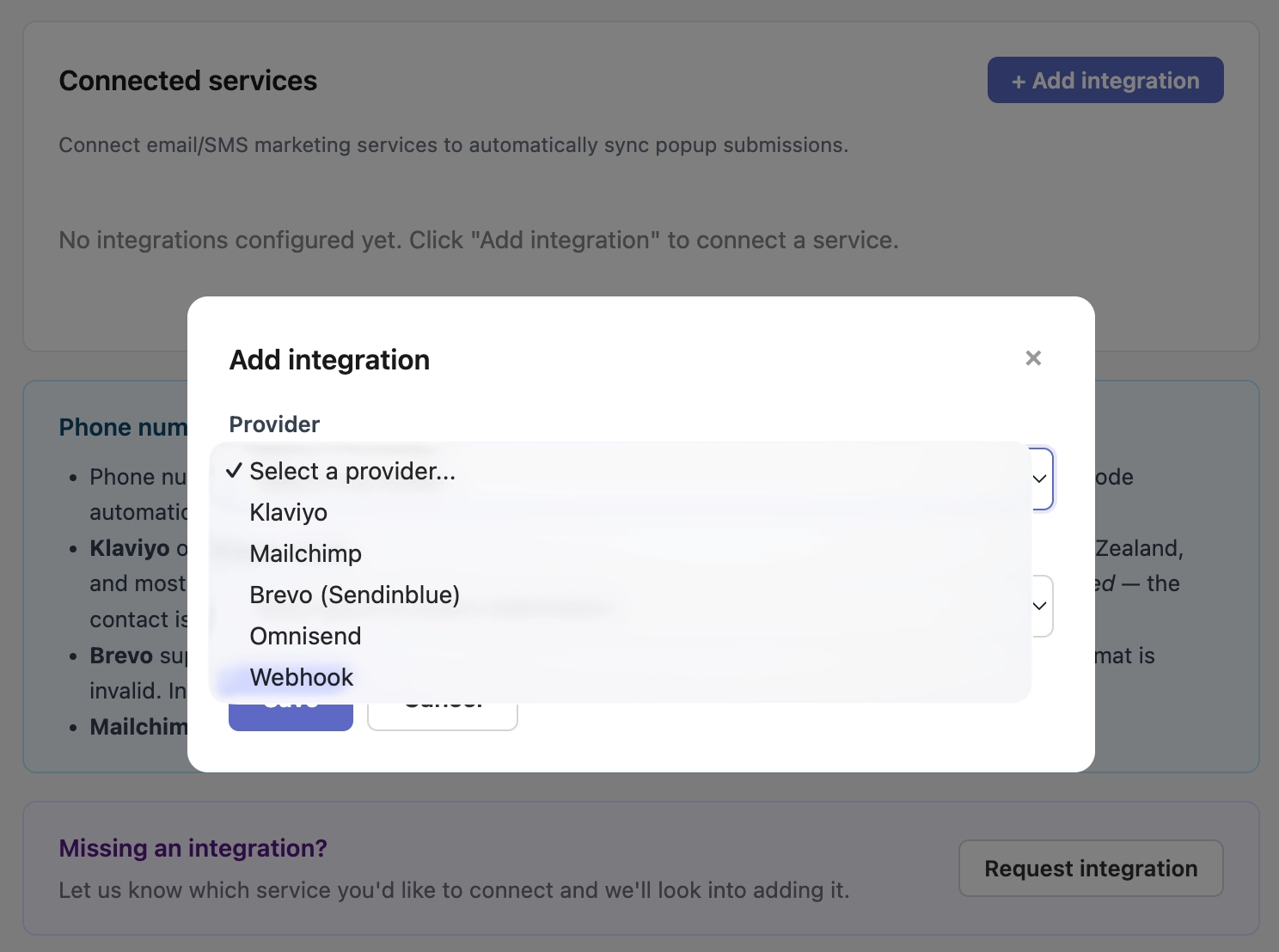
Klaviyo
The default email and SMS platform for growing Shopify stores. Poppy syncs submissions to Klaviyo in real time using the Klaviyo API. Each contact upsert includes email address, phone number (if captured), first name, last name, the source popup campaign name, and the submission timestamp. Phone numbers are normalised to E.164 format across 37+ countries before sync, so your Klaviyo SMS flows receive clean, diallable numbers.
Mailchimp
Classic list-based sync with full merge field mapping. Poppy passes first name, last name, phone, source, and campaign name as Mailchimp merge fields. Submissions are tagged with the Poppy campaign name so you can segment immediately in Mailchimp without any manual tagging step.
Omnisend
Email and SMS under one roof. When Poppy captures a phone number and syncs to Omnisend, it enables the SMS channel on that contact automatically — no separate opt-in step required in the Omnisend dashboard. Subscription status and contact tags are managed natively.
Brevo (formerly Sendinblue)
Contact list sync with SMS channel support. Poppy handles the case where a phone number is rejected by Brevo's carrier database — the email portion of the contact is still synced, and the error is logged without failing the whole submission.
Custom Webhook
For stores using a headless commerce stack, a proprietary CRM, or an in-house data pipeline: Poppy can POST submission data to any HTTPS endpoint in real time. Each request is signed with a merchant-generated secret so your receiving server can verify the payload's authenticity. Events are configurable — receive only submissions, only conversions, or both.
Five integrations, one app. Start your free trial
Built-in A/B Testing
Every Poppy campaign supports multiple design variants running simultaneously with weighted traffic distribution. Want to test a 10% discount against free shipping, or a spin wheel against a standard email form? Create both variants in the same campaign, set the traffic split, and let Poppy track which converts better.
What gets tracked per variant: conversion rate (submissions per view), engagement rate (interactions per impression), close rate (closes per view), and attributed revenue. A confidence threshold of 95% is the default before Poppy flags a winner — you can lower or raise it. The minimum impressions threshold (default: 500 per variant) prevents premature conclusions from low-traffic periods. Auto-optimize mode can automatically pause underperforming variants once a winner clears both thresholds, reallocating all traffic to the winner without manual intervention.
No third-party split-testing tool or Shopify Script required. A/B testing runs inside Poppy on the same campaign record.
Analytics That Show Revenue, Not Just Clicks
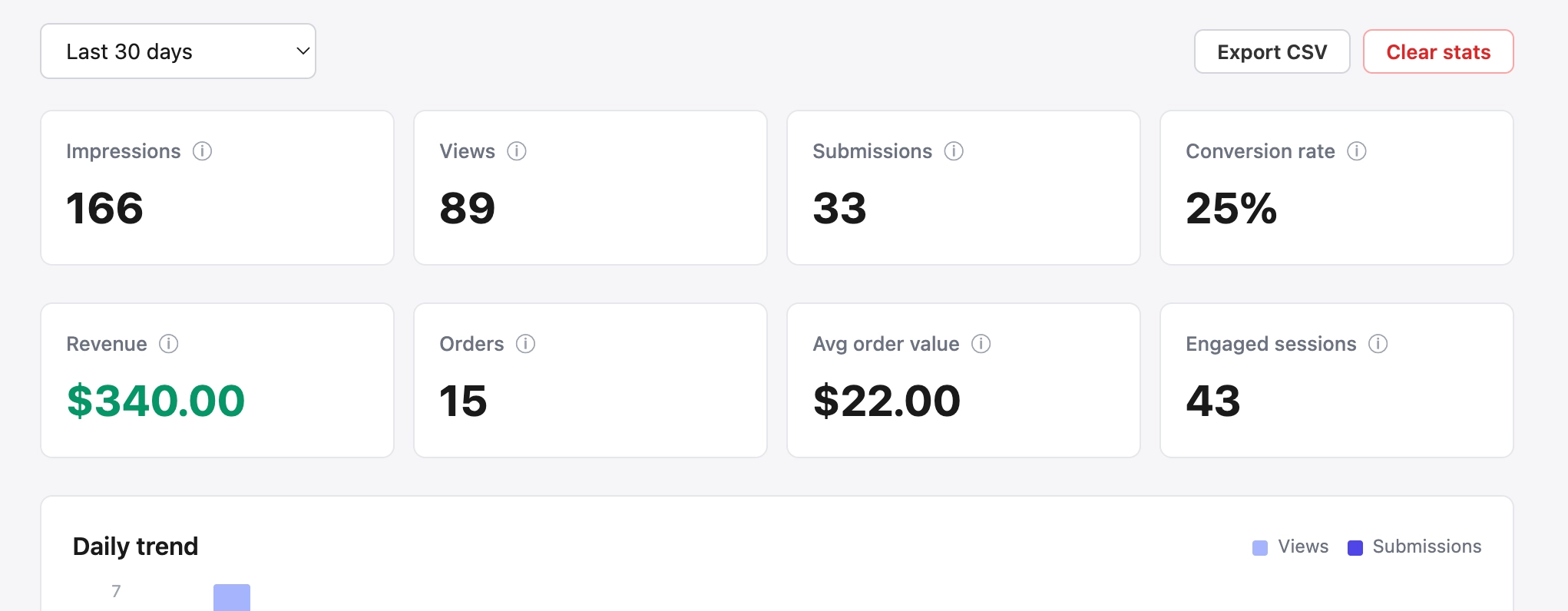
Poppy tracks six event types across the full funnel for every campaign:
- Impression — popup was triggered and available to be seen
- View — popup was actually rendered on screen
- Interaction — visitor engaged with the popup content (typed in a field, spun the wheel)
- Close — visitor dismissed the popup without submitting
- Submission — form was completed and sent
- Conversion — a confirmed order was placed by a visitor who previously submitted
Revenue attribution uses two channels simultaneously. The first is session-based: a conversion pixel fires when a confirmed order is placed in the same browser session as a popup submission. The second is discount code redemption: when a subscriber uses the unique code generated by their spin wheel, that order revenue is attributed to the popup campaign even if it happens days later. The two channels are deduped — a subscriber who submits and buys in the same session is counted once.
All metrics are available for any date range and export to CSV. Campaign-level rollups show 30-day totals by default; the date picker offers day, week, and month shortcuts for quick period comparisons.
How Poppy Compares to the Alternatives
There are three categories of tools in this space. First, specialist spin-wheel apps that do one popup type extremely well. Second, full email marketing suites (Klaviyo, Omnisend) that include basic popup forms as a feature inside a much larger platform. Third, dedicated popup platforms that handle multiple popup types and integrate with the email tools you already use. Poppy is in the third category.
| App | Popup types | Spin Wheel | A/B Testing | Native integrations | Revenue attribution | Price/mo |
|---|---|---|---|---|---|---|
| Poppy this post | 9+ | ✓ | ✓ | 5 + webhook | Session + code | $25 |
| Privy | ~5 | ✓ | ✓ | Built-in email only | Limited | $30+ |
| Wheelio | 1 (spin only) | ✓ | ✗ | ~5 | Code only | ~$15 |
| OptiMonk | ~10 | ✓ | ✓ | 4 | Cart-value | $29–$249 |
| Klaviyo Forms | ~3 | ✗ | ✓ | Klaviyo only | — | $20+ |
| Omnisend | ~4 | ✓ | ✓ | Built-in only | Limited | $16+ |
Data current as of June 2026. Pricing reflects entry-level paid plans; feature availability varies by tier for some apps.
Real Setups Shopify Merchants Run with Poppy
- New visitor, high-intent product page Trigger: time delay 4 seconds + visitor type "new" + URL matches
/products/*. Popup: email capture form with 10% first-order discount, auto-generated unique code. Targeting: NOT in Klaviyo "Welcome Series" list. Sync: Klaviyo list → triggers welcome email flow immediately. - Exit intent on cart page Trigger: exit intent + cart quantity ≥ 1. Popup: "Your cart is waiting — here's free shipping to complete your order." No email field required; just show the discount code and a checkout button. Targets visitors who added to cart but are about to leave.
- Spin wheel for engaged returning visitors Trigger: scroll depth 40% + visitor type "returning" + NOT in Klaviyo "All Subscribers" list. Popup: spin wheel with segments ranging from 5% off to free shipping. Duplicate submission detection prevents the same visitor from spinning twice. Syncs to Klaviyo and Omnisend SMS simultaneously.
- Flash sale countdown Trigger: time delay 3 seconds + campaign scheduled window (sale start to sale end). All visitors. Popup: countdown timer showing hours and minutes left + fixed-amount discount code. Syncs to Omnisend for an automated "sale ends soon" follow-up email 2 hours before expiry.
- Mobile SMS opt-in Trigger: scroll depth 60% + device type "mobile." Popup: two-field form (phone number with country selector + email), 15% off incentive. Phone number normalised to E.164 before sync. Data goes to Klaviyo SMS channel + Brevo contact list simultaneously.
Any of these fit your store? Install Poppy and set one up
How to Install and Set Up Poppy in 5 Minutes
- Install from the Shopify App Store. Search "Poppy Email Popup" in the Shopify App Store, or use the direct link. Click Install, accept the permissions, and you're in. The 3-day free trial starts on installation — no credit card required upfront.
- Create your first campaign. In the Poppy admin, click "New Campaign." Choose a popup type. Email capture is the fastest to configure and the best starting point if you're new to popup marketing. Give the campaign a descriptive name.
- Design it. The visual editor lets you set background color, font family, button color and text, form fields, heading copy, and a success message or redirect URL. Choose from pre-built templates to move faster. Custom CSS is supported for advanced customization.
- Set your trigger and targeting rules. Choose when it fires (exit intent, time delay, scroll depth), then define who sees it. At minimum: set visitor type to "new visitor" and exclude anyone already in your Klaviyo list. Save.
- Connect your email platform. Go to Integrations in the sidebar. Connect Klaviyo, Mailchimp, Omnisend, or Brevo with your API credentials. Use the built-in connection test to confirm everything is working before going live.
- Activate the campaign. Flip the campaign status to Active. Within a few minutes, Poppy's Theme App Extension is live on your storefront. Open an incognito window on your store to test it yourself.
Takes about 5 minutes. Start your free trial
Frequently Asked Questions
No. Shopify's built-in tools include the Shopify Email app for sending campaigns and basic newsletter subscription through the customer account signup — but there is no native on-site popup builder. To show email capture popups, spin wheels, exit-intent overlays, or countdown timers on your storefront, you need a third-party app from the Shopify App Store.
It depends on what you need. For a single, well-designed spin-wheel popup, Wheelio is focused and reasonably priced. For a platform that covers 9+ popup types, built-in A/B testing, detailed revenue attribution analytics, and native integrations with Klaviyo, Mailchimp, Omnisend, and Brevo — without needing separate apps for each function — Poppy handles the full stack at $25/month.
Google's page experience guidelines penalise intrusive interstitials that block content immediately on page load — for example, a full-screen popup that appears the instant a visitor arrives before they can see any content. Poppy avoids this by design: the default triggers (time delay, scroll depth, exit intent) all require the visitor to spend time on the page first. Exit-intent popups only fire when the visitor is already leaving, so there is nothing to penalise. Configured correctly, Poppy has no impact on your search rankings.
A spin-to-win popup (also called a spin wheel or lucky wheel) is a gamified email opt-in form. A visitor enters their email address, then spins a digital prize wheel. Each segment of the wheel can award a different outcome — a percentage discount, a fixed amount off, free shipping, or no prize. The uncertainty of the outcome generates significantly higher engagement than a static "get 10% off" discount banner. In Poppy, every winning spin generates a unique, single-use discount code so that codes cannot be shared on coupon aggregator sites or reused across sessions.
In Poppy, go to Integrations in the left sidebar. Select Klaviyo, enter your Klaviyo private API key, choose which list new subscribers should be added to, and click "Test Connection." From that point, every popup submission syncs to Klaviyo in real time — including email address, phone number, first name, last name, and the name of the Poppy campaign they submitted through. No CSV exports, no manual imports, no scheduled sync jobs.
Yes. Poppy's targeting rules include a visitor type dimension with three options: new visitor (first session), returning visitor (has visited before), and customer (logged in to a Shopify account). Create one campaign for new visitors with a welcome discount, and a separate campaign for returning visitors who haven't subscribed yet. Add a Klaviyo list membership rule ("visitor is not in list: All Subscribers") to both campaigns, and existing subscribers will never be shown an opt-in popup again.
Most dedicated Shopify popup apps run between $15 and $100 per month, depending on features and traffic volume. Poppy is $25 per month with a 3-day free trial and no page-view caps — your traffic can scale without your popup app bill scaling with it. For reference: Privy starts at $30/month, OptiMonk at $29 to $249/month depending on plan tier, and Wheelio at approximately $15/month for spin-wheel functionality only.
Your email list grows one popup at a time. Start with a 3-day free trial.
Install Poppy on Shopify Works with Klaviyo, Mailchimp, Omnisend, and Brevo. No page-view limits. Cancel anytime.